Private beta · for independent coaches
Your quietest
client
is
your next
cancellation. Logbook.fit, retention-first coaching software for independent coaches.
Clients go quiet weeks before they quit. Logbook.fit ranks your roster by who needs you today.
Clients
7 clients · 5 trained this week
To do · 4
Everyone else · 3
Priya Shah
Waiting on replyWaiting on their check-in · Upper / Lower Split
Daniel Okafor
On trackPowerlifting Prep · trained today
Leah Kim
On trackStrength Foundation · final week, line up the next block · trained yesterday
The north star
A loop, not a group chat.
A focused, contextual conversation that lives right inside the client workspace, not buried in WhatsApp.
- 01
Coach sends a check-in
One tap opens a structured check-in for the client. No chasing, no copy-pasted questions.
- 02
Client responds
Effort rating, how their body feels, and notes, captured in seconds, right after training.
- 03
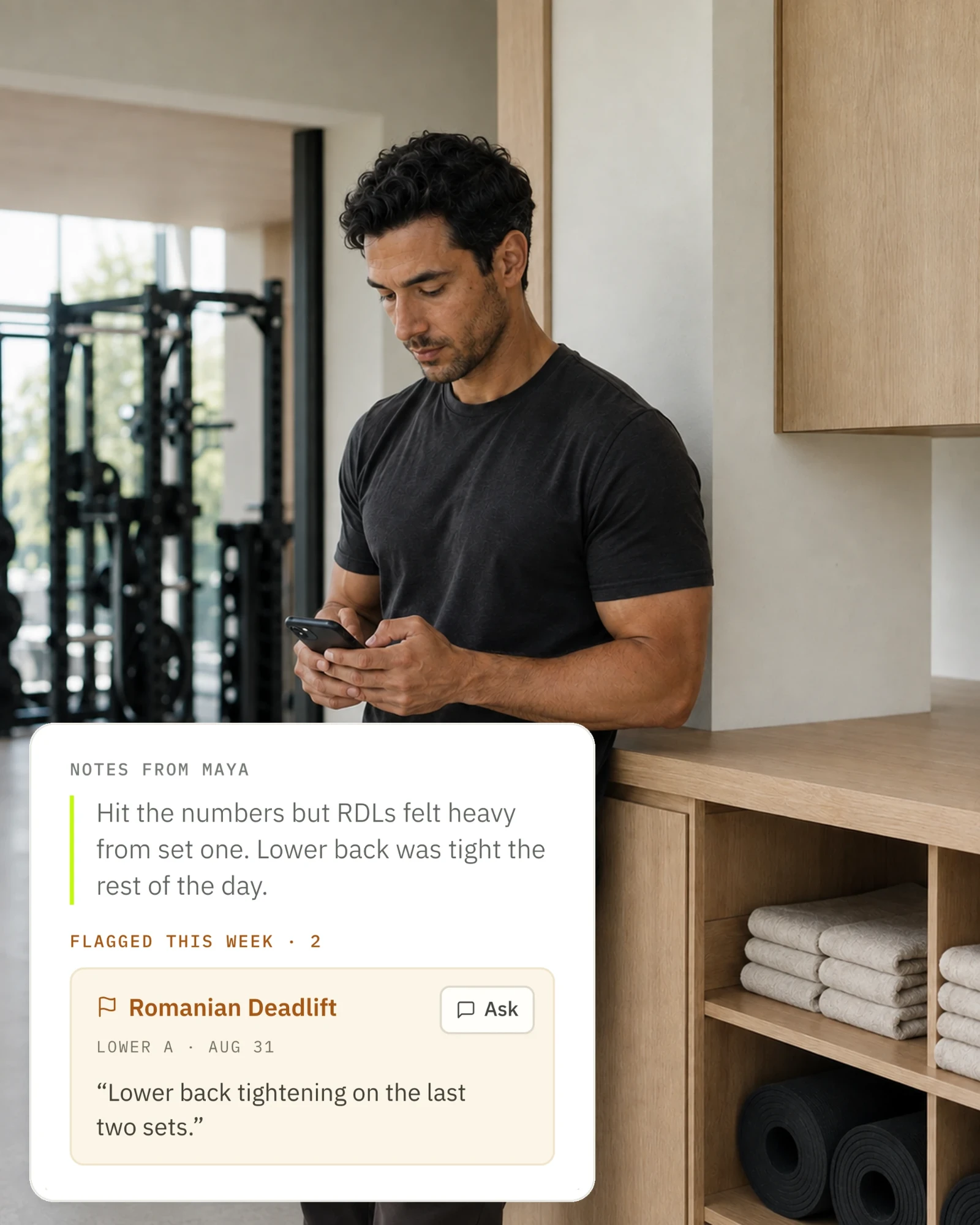
Coach reviews in context
The response lands next to flagged exercises from the past week, so nothing gets read in isolation.
- 04
Coach replies & adjusts
Send feedback and mark “I’ll adjust the plan.” The loop closes where the plan lives.
Their side
They’ll actually use it.
An early warning only works if the data arrives. Your clients get an app worth opening.
Today focus view
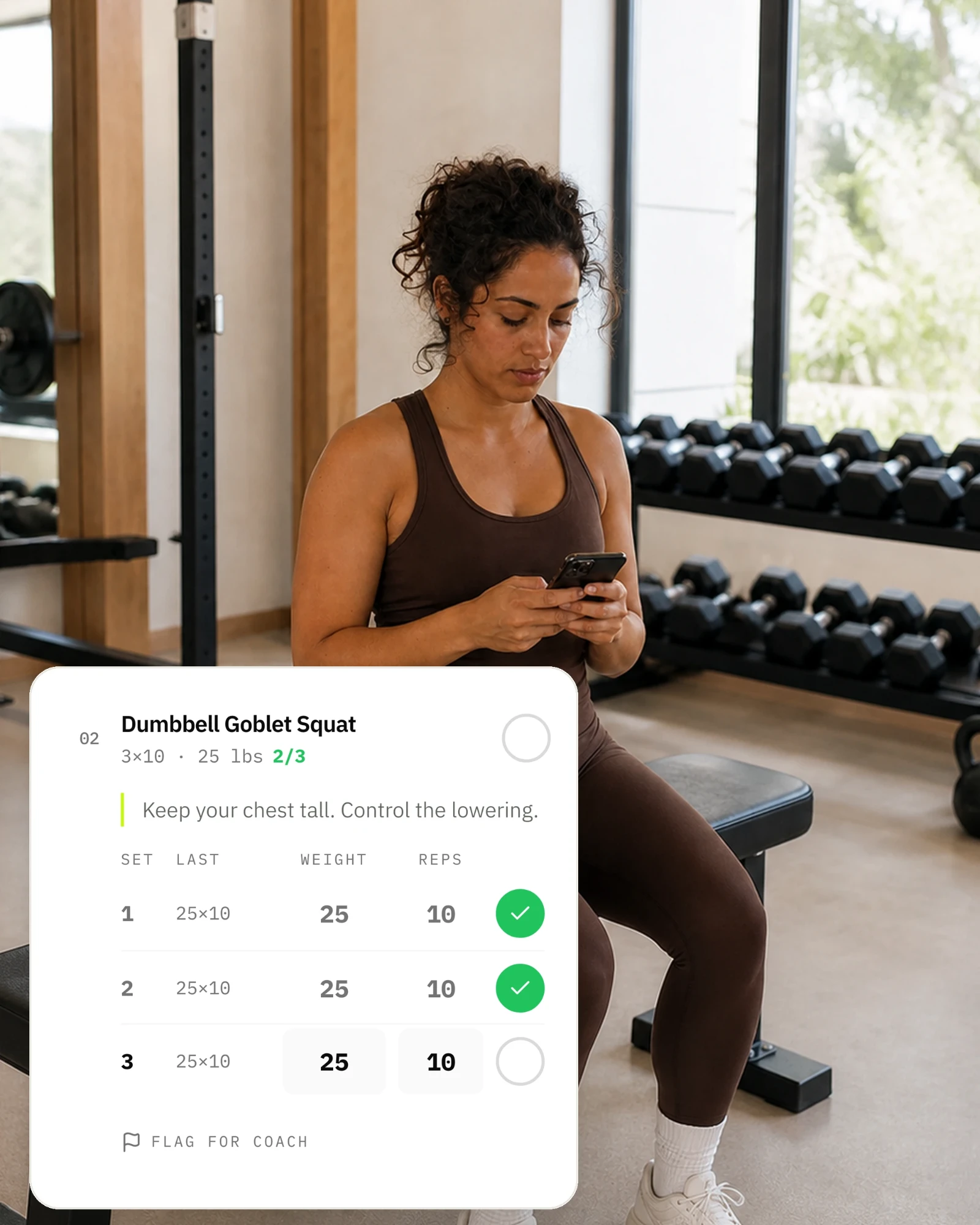
Exactly what’s scheduled today, with the coach’s notes front and center.
Live workout execution
Tap through sets, override weight and reps on the fly, and flag what doesn’t feel right.
A direct line to the coach
Flags and check-ins turn into focused conversations, not another group chat.
Progress at a glance
Completion history and weekly progress without digging through spreadsheets.
For coaches
Built for coaches.
No manual triage. A workspace that surfaces the right client at the right time.
Urgency-sorted dashboard
Clients ranked by who needs attention most: at-risk, check-in due, awaiting response, on track.
Workout plan builder
Multi-week plans with a visual week/day sidebar. Duplicate, reorder, and copy across days.
Exercise library
Your own library with categories, default prescriptions, and coaching notes.
Invite-based onboarding
Send a link with a personal note. They sign up already connected, your words waiting in chat.
Who it’s for
Deliberately not
for everyone.
Built for
- 01Independent coaches with a real roster
- 02You write the plans and run the check‑ins
- 03Outgrowing spreadsheets and WhatsApp
Not for
- 01Lifters training on their own
- 02Anyone who just wants a workout log
- 03Coaches happy with their spreadsheet
Sound like you?
Request an inviteAlready in a spreadsheet?
Bring it with you.
Upload the Excel or CSV you coach from. Logbook.fit reads your layout and shows you every week before it saves, so a client can train from your program the same day.
| Exercise | |||
|---|---|---|---|
| Back squat, RPE 7 | 3×5 100kg | 3×5 105kg | 3×5 110kg |
| Romanian deadlift | 3×8 80kg | 3×8 85kg | 3×8 90kg |
| Split squat (per side) | 3×10 | 3×10 | 3×12 |
Read automatically from your layout. Check it against your spreadsheet before you create the plan. 3 weeks · 3 workouts a week
Lower A, Week 1
- Back squatRPE 73 × 5 · 100 kg
- Romanian deadlift3 × 8 · 80 kg
- Split squatPer side3 × 10
Questions
Before you join.
Straight answers to what coaches ask before they hand over an email.
07 questions
Who is Logbook.fit for?
Independent coaches who write their own programs and run their own check-ins, whether that’s five clients or thirty. It isn’t a workout log for people training on their own.
How is it different from Trainerize or TrueCoach?
It’s built around one question: which client needs you today? Your roster is ranked by who’s at risk, whose check-in is due and who’s waiting on your reply, so a quiet client shows up before they cancel. It doesn’t track nutrition or take payments, so if you need those, a bigger platform is the better fit.
Can I bring my programs from a spreadsheet?
Yes. Upload the Excel or CSV file you coach from. Logbook.fit reads your layout and shows you every week before anything is saved, so you don’t retype a thing. How importing works
What do my clients need?
Just their phone. They join from the invite link you send, train from Logbook.fit in their browser, and can add it to their home screen like an app.
What does it cost?
Logbook.fit is free during the private beta. Coaches who join during the beta keep a founding price, lower than the regular one, for as long as they stay, and you’ll hear about pricing well before anything costs money.
When will I get my invite?
Right away if you book your setup call when you sign up: the invite comes as soon as the call is booked, and on the call we bring your programs across with you. Otherwise it comes to the email you signed up with when your spot opens.
Who can see my clients’ data?
You and the clients you coach, and nobody else. We don’t sell data or run ad trackers. Privacy Policy
Private beta · for independent coaches
Get on
the list.
Ten coaches at a time. Every one gets a setup call where we import your roster with you.
- Free in the beta
- Then a founding price
- Setup call included
What happens next
Request an invite
Leave your email below.
Book your setup call
Your invite comes as soon as it’s booked, and we bring your programs across on the call.
Invite your clients
Send each one a link. They join already connected to you.